
Grundig GW9I91041A handleiding
Handleiding
Je bekijkt pagina 21 van 48
EN / 21
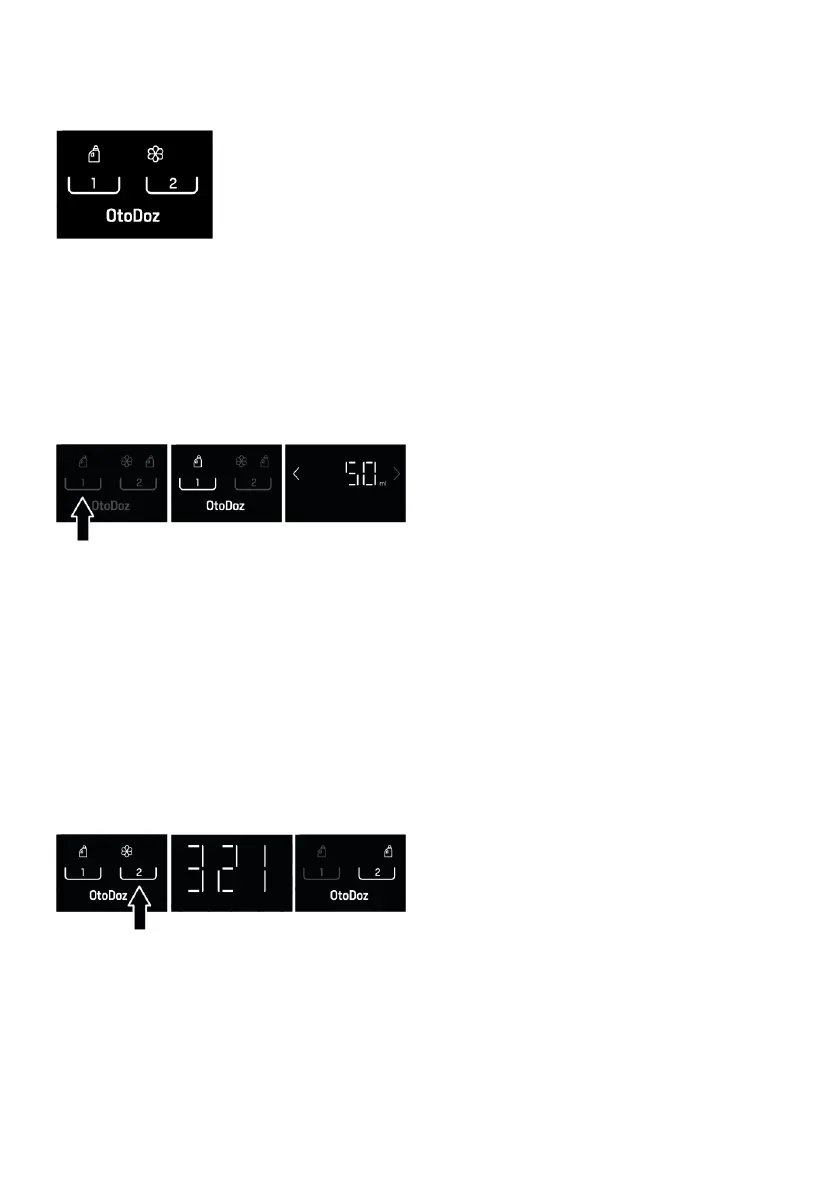
Selecting the Dosage for Liquid Detergent
or Softener and Adjusting the Amount of
Dosage:
During first use, the default settings will be
liquid detergent for compartment No.1 and
softener for compartment No.2, as shown
above.
In programs where you are allowed to use
automated dosing by pressing dosage se-
lection buttons (1 and 2), you can change
the selections for liquid detergent and
softener.
To activate the liquid detergent compart-
ment No. 1, press the dosage button No.1
on the screen. The liquid detergent symbol
No. 1 will turn on and the dosing amount in
ml will be displayed on the information
screen for a while. If you wish, you can use
the left and right arrows (< / >) to save in
the machine the amount recommended for
the detergent you are using, or to change
the saved value.
To deactivate the liquid detergent compart-
ment No 1, press the same button again.
The liquid detergent symbol will go off.
The compartment No. 2 is used only for
softener or only for an alternative liquid de-
tergent, depending on your choice. If you
want to use an alternative liquid detergent
instead of softener in this compartment,
press the dosage button No 2. For 3
seconds. When the countdown “3-2-1” on
the information screen goes off, the
softener symbol will go off and the liquid
detergent symbol will turn on. After the
change, the dosing amount in ml will be dis-
played on the information screen for a
while. If you wish, you can use the left and
right arrows (< / >) to save in the machine
the amount recommended for the deter-
gent you are using, or to change the saved
value. Repeat the same procedure to go
back to using softener.
When you are finished adjusting the dosing
amount, you can press any button to exit
the setting screen. If you do not press any-
thing, the product will automatically exit
this screen after a while. For all pro-
grammes, dosing will be performed based
on the latest settings you have selected un-
til you select a new setting.
Take into account the amount of laundry,
the amount of soiling of the laundry and the
water hardness for the use of sufficient
amount of detergent in washing. For auto-
matic dosing, in order for your machine to
dose the appropriate amount of detergent,
please define the recommended amounts
given on the package of the detergent you
use to the machine.
You can find out the water hardness from
the water administration responsible for
your location, or you can determine it by ap-
plying the water hardness test. Detergent
manufacturers recommend using more de-
tergent when the water hardness is high.
Considering the water hardness, you can
define a reference value between 15- 200
mL for 4- 5 kg of medium soiled laundry.
The dosage amount will be adjusted auto-
matically based on the sensed laundry
characteristics.
For Soft / Medium water hardness:
Lightly Soiled: a mL.
Medium Soiled: b mL.
Heavily Soiled: c mL.
For hard water hardness:
Lightly Soiled: d mL.
Medium Soiled: e mL.
Heavily Soiled: f mL.
Bekijk gratis de handleiding van Grundig GW9I91041A, stel vragen en lees de antwoorden op veelvoorkomende problemen, of gebruik onze assistent om sneller informatie in de handleiding te vinden of uitleg te krijgen over specifieke functies.
Productinformatie
| Merk | Grundig |
| Model | GW9I91041A |
| Categorie | Wasmachine |
| Taal | Nederlands |
| Grootte | 4348 MB |





