
Grundig GW9I91041A handleiding
Handleiding
Je bekijkt pagina 14 van 48
EN / 14
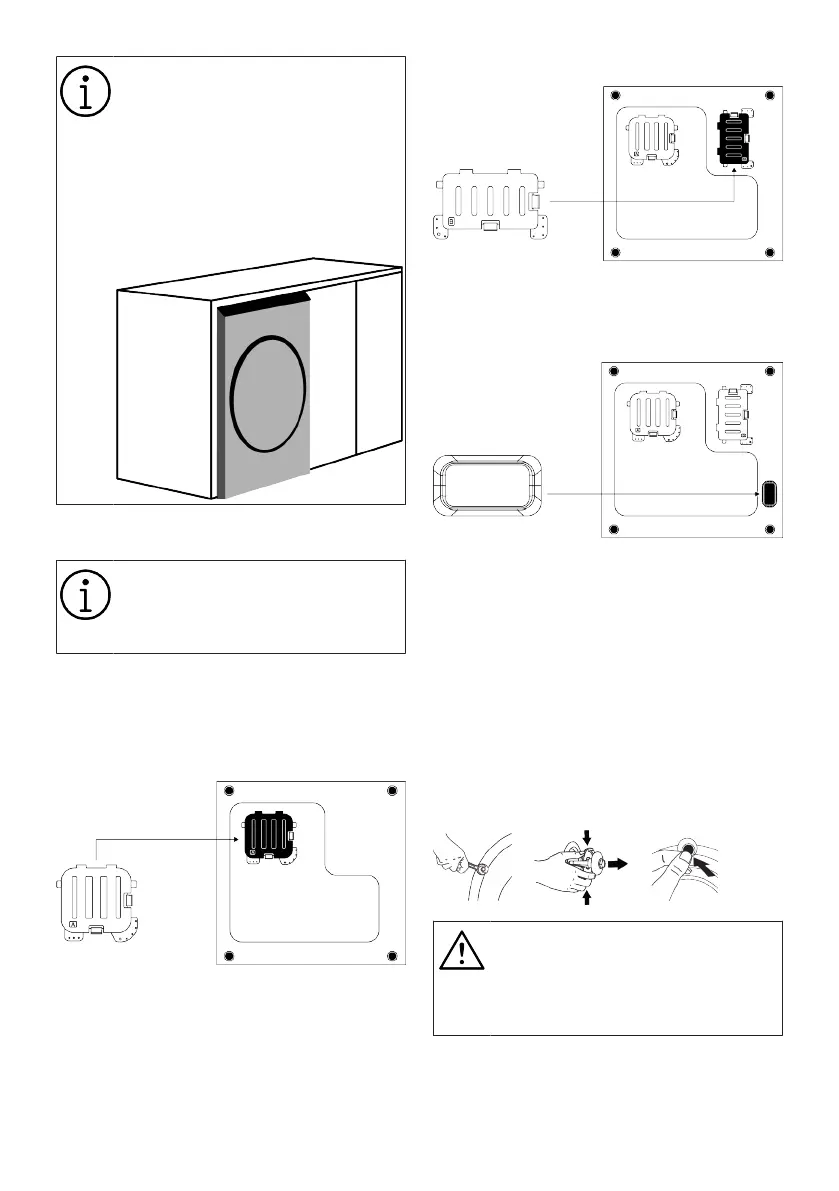
Your product is not suitable for use
on under counter cabinets with
doors.
If you want to use the product in
the above-mentioned way, please
remove the cabinet door and pull
the product to the front as shown in
the figure so that the control panel
is accessible.
4.2 Assembly of Bottom Panel Covers
With some models, the base parts
of the products are completely
closed. These products do not have
plugs and covers.
• In order to increase the sound comfort of
the product, attach cover A after remov-
ing the package foam.
Cover A
Tilt the machine back slightly. Rest the tabs
of Cover A against the lower panel. Com-
plete the assembly by rotating the cover.
• Cover B and the Cap are optional. If avail-
able, attach cover B and the Cap.
Cover B
Rest the tabs of Cover B against the lower
panel. Complete the assembly by rotating
the cover.
Cap
Insert the cap by pushing it with your finger.
4.3 Removing Transportation Safety
Bolts
1. Loosen all transportation safety bolts
with an appropriate wrench until they
turn freely.
2. Bend the inner part by pressing it at the
grip areas and pull the part out.
3. Attach the plastic covers supplied in the
User Manual bag into the holes on the
rear panel.
NOTICE
Remove the transportation safety
bolts before operating the product.
Otherwise, the product will get
damaged.
Bekijk gratis de handleiding van Grundig GW9I91041A, stel vragen en lees de antwoorden op veelvoorkomende problemen, of gebruik onze assistent om sneller informatie in de handleiding te vinden of uitleg te krijgen over specifieke functies.
Productinformatie
| Merk | Grundig |
| Model | GW9I91041A |
| Categorie | Wasmachine |
| Taal | Nederlands |
| Grootte | 4348 MB |





