Gorenje DPNE92/GNLWIFI handleiding
Handleiding
Je bekijkt pagina 46 van 63
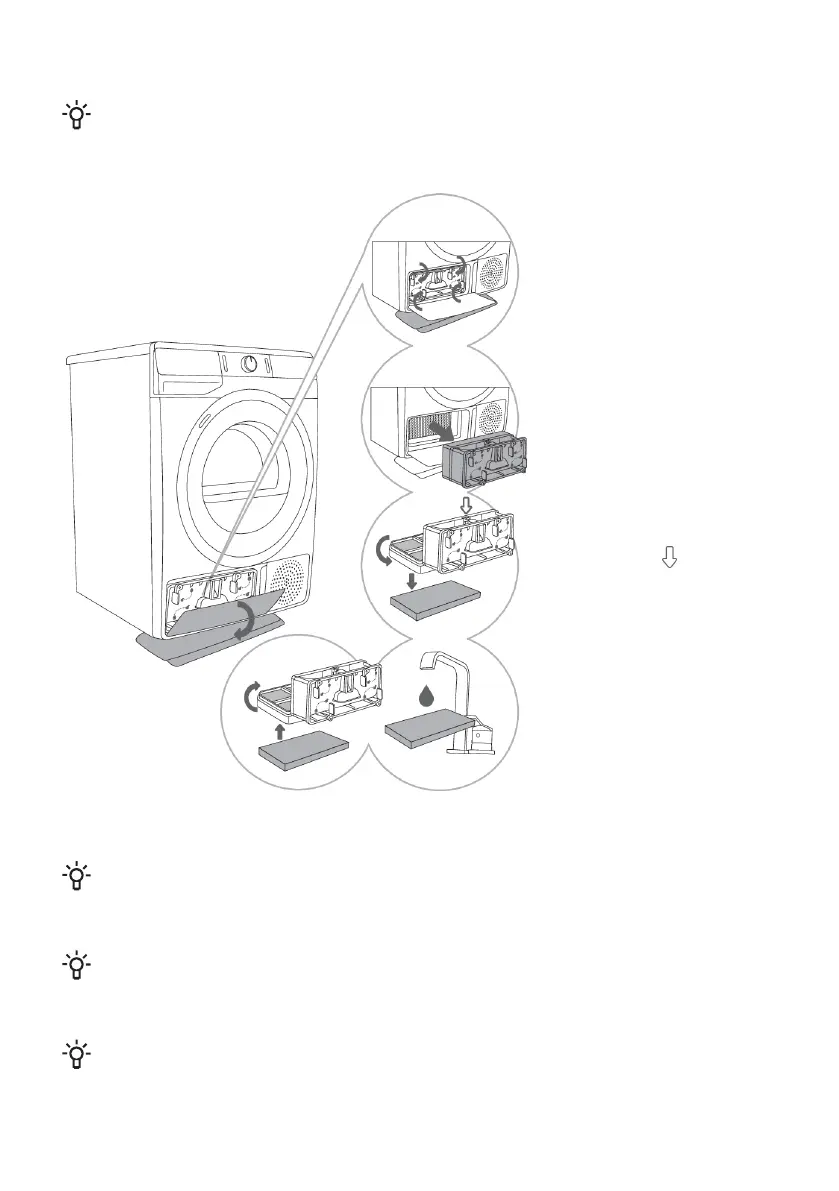
Cleaning the heat pump filter
INFORMATION!
During cleaning, some water may be spilled. It is therefore recommended to place an absorbent
cloth on the floor.
1 Open the outside cover.
Hold the levers on the inside
cover and rotate them as
indicated by the arrows.
2 Remove the inside cover
along with the heat pump
filter.
3 Detach the front filter
part from the heat pump
filter housing and open it.
Push the foam part of the
filter out from the housing.
Use a damp cloth to clean
the heat pump filter mesh.
4,5 Wash the sponge
filter under running water
and dry it, or vacuum the
dust and lint from the filter.
Replace the clean sponge
filter into the filter housing.
INFORMATION!
Insert the heat pump foam filter into the housing and close the outer cover (push it upwards
toward the machine until it latches into place).
INFORMATION!
The heat pump filter has to be correctly inserted into its slot. Otherwise, the heat exchanger
installed inside the dryer may be clogged or damaged.
INFORMATION!
Clean the foam filter at least after every five drying cycles.
46
Bekijk gratis de handleiding van Gorenje DPNE92/GNLWIFI, stel vragen en lees de antwoorden op veelvoorkomende problemen, of gebruik onze assistent om sneller informatie in de handleiding te vinden of uitleg te krijgen over specifieke functies.
Productinformatie
| Merk | Gorenje |
| Model | DPNE92/GNLWIFI |
| Categorie | Wasmachine |
| Taal | Nederlands |
| Grootte | 4636 MB |