Electrolux EFI974EY6S handleiding
Handleiding
Je bekijkt pagina 13 van 352
taking care of the garments and enhancing
the user experience.
The washing temperature adapts to each
SmartSelect level according to the
selected cycle to ensure the best
performance, without the need to change
the temperature manually.
For more details refer to SmartSelect
section in "Dials and button" chapter.
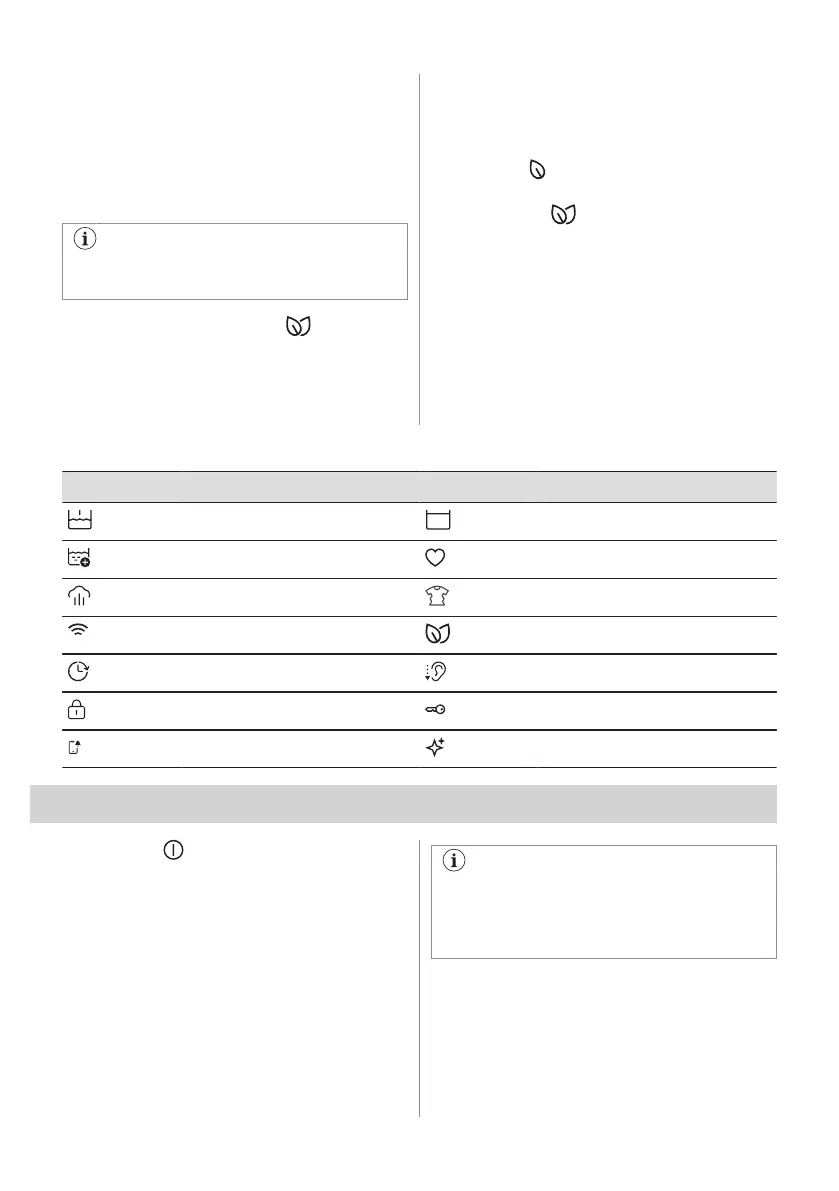
6.3 SmartLeaf feedback
SmartLeaf feedback shows how energy-
efficient a programme is, based on energy
consumption.
There are three different level of SmartLeaf
feedback indicated by the leaf icon:
1. No leaf lit indicates an average
consumption level.
2. One leaf icon indicates a good
consumption level.
3. Two leaves icon indicates the best
consumption level.
6.4 Main symbols legend
Symbol Description Symbol Description
Prewash indicator. Rinse Hold indicator.
Extra Rinse indicator. Favourite indicator.
Steam indicator. Steam Anticrease indicator.
Wi-Fi connection indicator. SmartLeaf indicator.
Finish in indicator. Silent indicator.
Child Lock indicator. Door locked indicator.
Notification indicator. Drum clean indicator.
7. DIAL AND BUTTONS
7.1 On/Off
Press and hold briefly this button for a few
seconds to activate or deactivate the
appliance. A dedicated jingle sound while
switching the appliance on or off, lights and
display switches on and Start/Pause button
led pulse.
The default selected programme, at
machine switch on, is always the Eco
40-60 programme, also after wake up
from standby.
7.2 Programme dial
By rotating the programme dial it is possible
to select the desired programme.
ENGLISH 13
Bekijk gratis de handleiding van Electrolux EFI974EY6S, stel vragen en lees de antwoorden op veelvoorkomende problemen, of gebruik onze assistent om sneller informatie in de handleiding te vinden of uitleg te krijgen over specifieke functies.
Productinformatie
| Merk | Electrolux |
| Model | EFI974EY6S |
| Categorie | Wasmachine |
| Taal | Nederlands |
| Grootte | 33928 MB |