Corberó CLH1404VIAD handleiding
Handleiding
Je bekijkt pagina 65 van 101
CLH1404VIAD
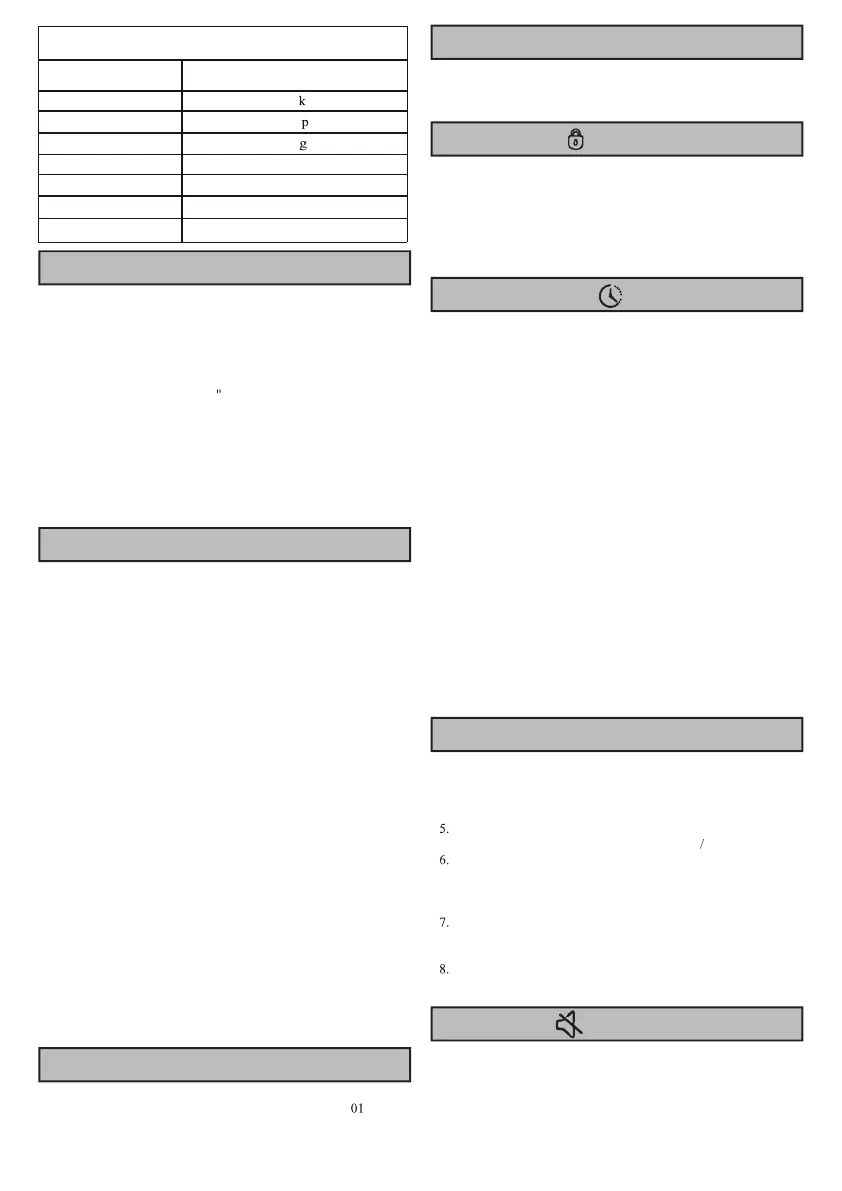
PARAMETER
Model
Washing Capacity
10.0 g
Max.spin speed
1400r m
Net Weight
69k
Dimension(WXDXH) 595X610X845mm
Rated Voltage
220-240V~
Heating Power
1500W
Washing Power
250W
Load the clothes to be washed m the drum and close the door. Add
the detergent into the relevant compartments for the type of program
you are going to select, Add detergent as described in Auto Dosing
operation guide.
1.Press the "On/Off'' button.
2.Press program selection button to required program, start up and
default the program as "Cotton
3.Select washing temperature and spin speed by pressing
"Temp."and "Spin" buttons.
4.Press "Prewash" ,"Extra Rinse","Time save", "Power Save" button
to select additional functions.
5.After starting the program, display window displays program
length (hours: minutes), washing temperature and additional
function options in sequence.
Add Detergent, Close the Door and Set the Program
Addition function selection
Delay End Function
Door Lock Icon
Drainage warning
Favourite
Inlet water warning
Mute Function
At standby state, press "Prewash" ,"Extra Rinse","Power save",
"Time save"button to select additional function for current program.
Select the function , and then corresponding icon ligbts up.
After starting up, program cannot be changed.
Pre-wash
·Select the function to conduct pre-wash so as to enhance washing
effects and better remove stains. Tbis function is suitable for heavy
dirt clothes.
Power Save
·The Power Save indication lamp is on after the function is selected,
and the indication lamp will be off after the program ends.
·The Power Save function is only added under the standby state of
its applicable program, that is, before the program is started. After
the program is started, the function cannot be selected.
·The actual temperature be reduced by 5°C and the main wash time
be reduced after the function is selected.
Extra Rinse
After set the function of Extra Rinse, the program runs the rinsing
process once again before running the softening, and the total
running time of the program increases accordingly.
Time Save
After pressing tbis function button,the program time will be
shortened according to the setting,and the program time will be
increased back to the original setting by pressing theTime
Savebutton again.After the program starts,the indicator ligbt is
always on.
This function is only added under the standby state of its applicable
program, that is, before the program is started. After the program is
started, the function cannot be selected.
After tbis function is selected, the determined main washing time
will be reduced by 15 mins.
If tap is not opened, or water pressure is over low, inlet water
fault icon will display, and display screen will prompt "F
" to
give alarm.
If the pipe is squeezed, drainage will not be smooth. In case of
failing to completely drain for long time, drainage fault icon will
display, and display screen will prompt "F03" to give alarm
After the program starts the Door Lock icon will light up and the
door will be locked.
·After completing program, door lock unlocks automatically.
During pause, if door opening condition can be met halfway, the
door lock will unlock and its indicator light will go out.
·When door lock indicator light flashes, door shall not be opened
forcibly so as to avoid personal injury.
Delay End function allows to run the machine at the consumers'
convenience, for example, at night when electricity is cheaper.
•Only under the standby mode, this button is valid for selecting
the reservation time.
•After the reservation function is selected, the time will increase
lh when each time the reservation button is pressed.
Before reservation, if the program time does not satisfy the
integral multiple of lh, it shall be completed by pressing the
reservation key for the first time, and then the time increases lh
when each time the reservation button is pressed. If the
reservation is selected, before the program runs, the current
reservation can be canceled by turning the button to select other
programs.
•The delay time must be longer than the wash program length
as the delay time is the time program will finish. For example: if
the selected program time is 02:28, the delay time selected must
be between 03:00 and 24:00.
•When the reservation process is operated, the icon of
'reservation time' will be on. When the reservation process
startup, the icon of 'reservation time' will flash.
•Long press the Delay End button,the reservation time jumps
fast.
1.Press the "On/Off "button to tum on the machine;
2.Select the washing program;
3.Select parameters(washing temperature ,spin speed,etc); 4.Press
Favourite button for 3 seconds;
Favourite is stored(only one program can be stored},select
Favourite when using tbis program,press "Start
Pause"to start;
When the user uses it for the first time, ifhe/she has never long
pressed the Favorite button to collect programs, he/she can short
press the Favorite button and then the cotton linen program and its
default settings will be collected by default;
Short press Favourite button,then the symbol is on. Repeat the
same operation or press other buttons to exit this program, the
symbol is off;
After selecting other functions, long press 3 seconds to override
the original program.
When the machine is in the state of holding, pause or operation,
press "Spin+Favourite" buttons for 2 seconds, the Mute icon will
light up. All the buzzing will be turned off except the alarms.
When the machine is in the mute state, press "Spin+Favourite"
buttons for 2 seconds, the Mute icon will turn off. All the buzzing
will be activated.
65
Bekijk gratis de handleiding van Corberó CLH1404VIAD, stel vragen en lees de antwoorden op veelvoorkomende problemen, of gebruik onze assistent om sneller informatie in de handleiding te vinden of uitleg te krijgen over specifieke functies.
Productinformatie
| Merk | Corberó |
| Model | CLH1404VIAD |
| Categorie | Wasmachine |
| Taal | Nederlands |
| Grootte | 10651 MB |