
Caple WMI3100 handleiding
Handleiding
Je bekijkt pagina 57 van 64
57Instruction manual WMi3100Please keep this instruction manual for future reference
5. After cleaning, re-t the lter by inserting it and turning clockwise.
6. When closing the pump cover, ensure that the mountings inside the cover meet the holes on
the front panel side.
7. Close the lter cover.
WARNING
The water in the pump may be hot, wait until it has cooled down before carrying out any
cleaning or maintenance.
[*] Specications may vary depending on the machine purchased.
[**]To remove the plinth, please follow the Built-in Installation Manual instructions.
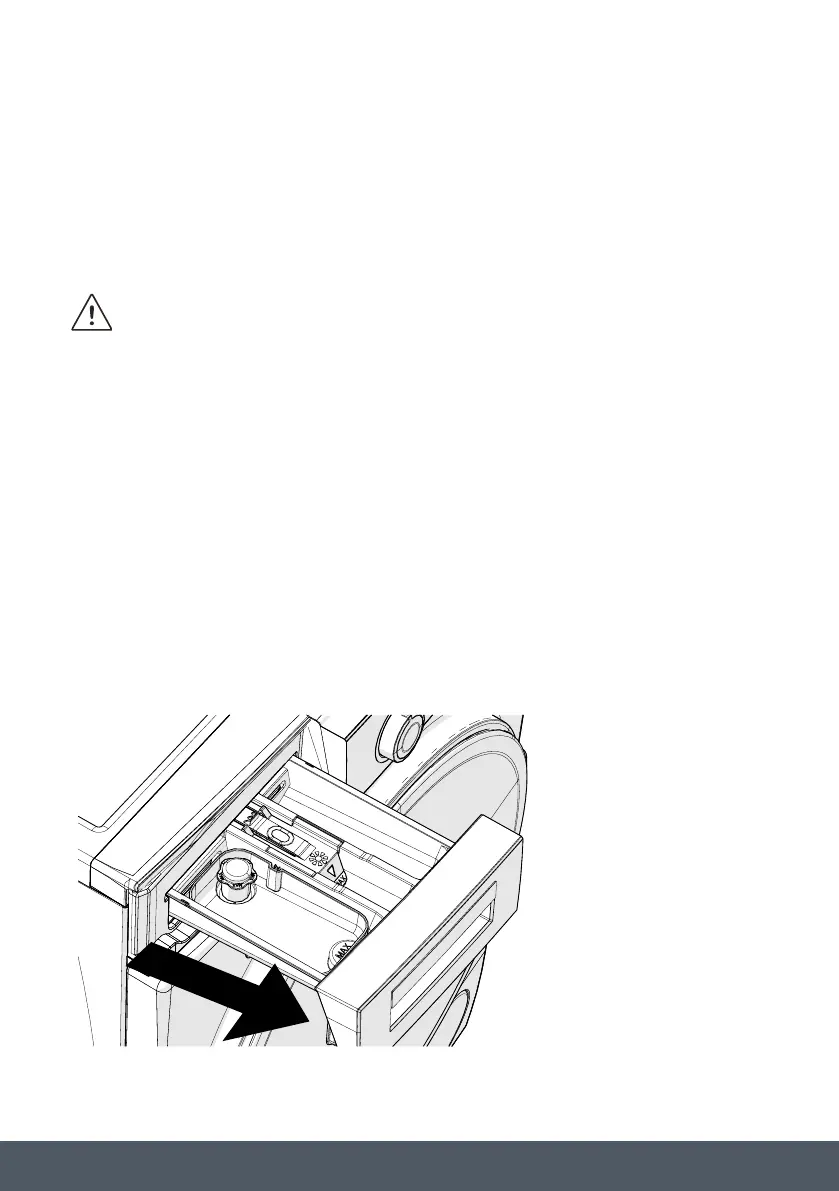
DETERGENT DRAWER
The use of detergent may cause residual build up in the detergent drawer over time. We
recommend that you remove the drawer every 2 months to clean the accumulated residue.
To remove the detergent drawer:
› Pull the drawer forwards until it is fully extended.
› Press the region shown
below inside the detergent
drawer you have pulled
all the way back, and
continue pulling and
remove the detergent
drawer from its place.
Pump Filter
The pump filter system in your Washing
Machine prolongs the life of the pump
by preventing lint from entering your
machine.
filter every 2 months.
The pump filter is located behind the
cover on the front-lower right corner.
To clean the pump filter:
You may use the washing powder
spade (*) supplied with your machine
or liquid detergent level plate to open
or liquid detergent level plate in the
opening of the cover and gently press
backwards. The cover will open.
Before opening the filter cover, place
a container under the filter cover to
collect any water left in the machine.
Loosen the filter by turning
anticlockwise and remove by pulling.
Wait for the water to drain.
Depending on the
amount of water inside the machine, you
may have to empty the water collection
container a few times.
Remove any foreign materials from
the filter with a soft brush.
After cleaning, re-fit the filter by
inserting it and turning clockwise.
When closing the pump cover, ensure
that the mountings inside the cover
meet the holes on the front panel side.
Close the filter cover.
The water in
the pump may be hot, wait until it has
cooled down before carrying out any
cleaning or maintenance.
(*) Specifications may vary depending on
the machine purchased.
(**)To remove the plinth, please follow
the Built-in Installation Manual
instructions.
The use of detergent may cause residual
build up in the detergent drawer over
time. We recommend that you remove
accumulated residue.
Pull the drawer forwards until it is fully
.
Bekijk gratis de handleiding van Caple WMI3100, stel vragen en lees de antwoorden op veelvoorkomende problemen, of gebruik onze assistent om sneller informatie in de handleiding te vinden of uitleg te krijgen over specifieke functies.
Productinformatie
| Merk | Caple |
| Model | WMI3100 |
| Categorie | Wasmachine |
| Taal | Nederlands |
| Grootte | 6400 MB |