
Handleiding
Je bekijkt pagina 13 van 38
3
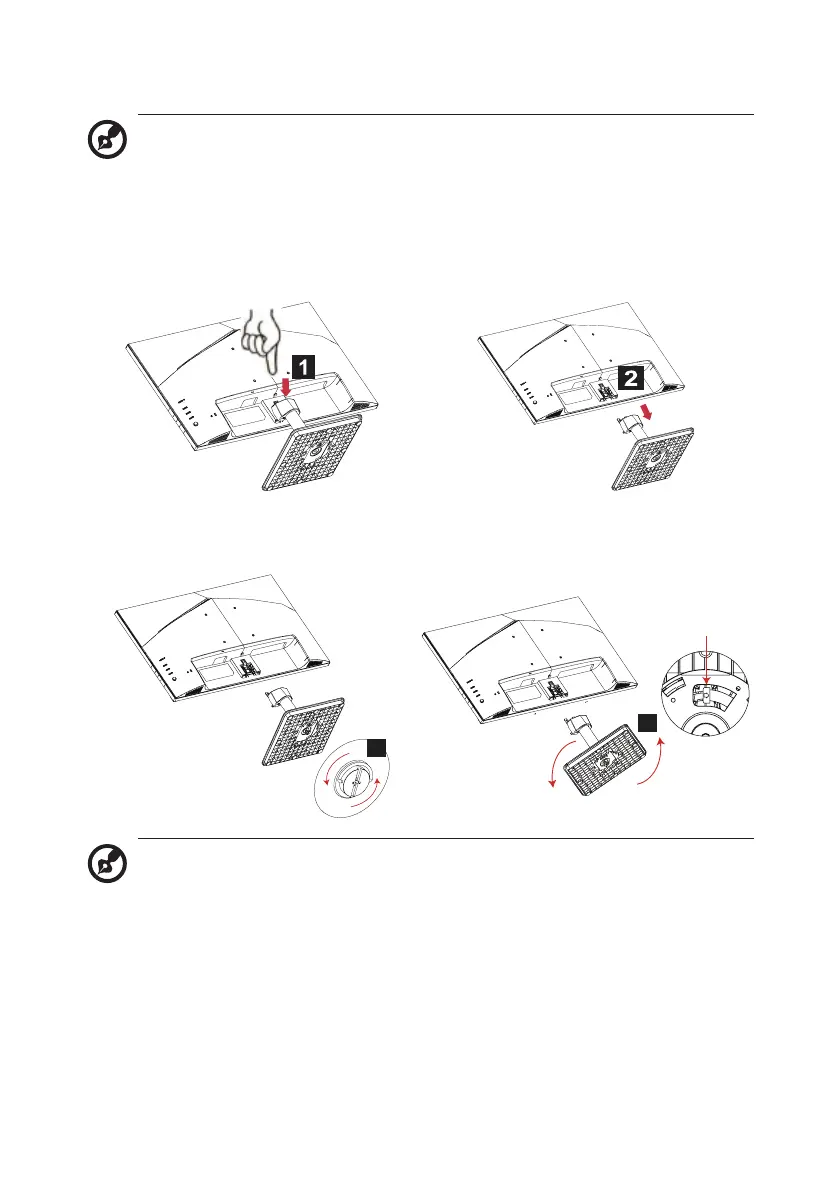
Follow these instructions to remove the base from the monitor.
Note:
Carefully place the monitor face down on a flat surface-sue a
cloth pad to prevent scratching the screen.
1. Press the release latch with your
finger.
2. Pull in the direction of the arrow,
then remove the stand base from
the monitor.
3. Loosen the screw from the stand. 4. Twist the stand arm to detach the
satand arm.
3
4
Release tab
Note: When releasing the stand arm from base, loosen the screw
first, then pull and hold the
Release tab
on the bottom of the base
and twist the stand arm counter clockwise to detach the stand arm.
Bekijk gratis de handleiding van Acer VVA241Y, stel vragen en lees de antwoorden op veelvoorkomende problemen, of gebruik onze assistent om sneller informatie in de handleiding te vinden of uitleg te krijgen over specifieke functies.
Productinformatie
| Merk | Acer |
| Model | VVA241Y |
| Categorie | Monitor |
| Taal | Nederlands |
| Grootte | 2526 MB |
Caratteristiche Prodotto
| Kleur van het product | Zwart |
| LED-indicatoren | Ja |
| Beeldschermdiagonaal | 23.8 " |
| Resolutie | 1920 x 1080 Pixels |
| Touchscreen | Nee |


