
Handleiding
Je bekijkt pagina 13 van 25
English
2
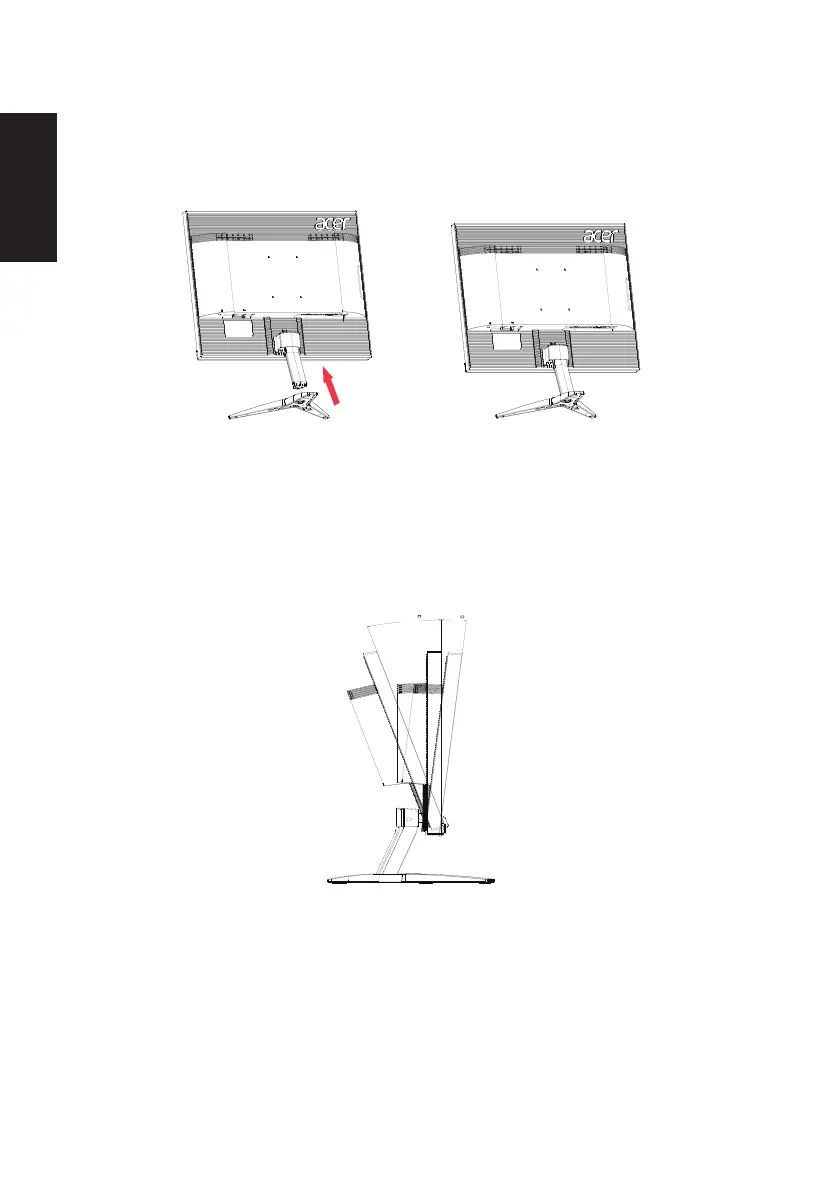
• Attaching the Base
Note: Remove the monitor and monitor base from its packaging. Carefully place the monitor
face-down on a stable surface -- use a cloth to avoid scratching the screen.
• Screen position adjustment
To optimize the viewing position, you can adjust the monitor tilt by using both of your
hands to hold the edges of the monitor as shown below. The monitor can be adjusted to 15
degrees up or 5 degrees down.
15
-5
Bekijk gratis de handleiding van Acer KG241P, stel vragen en lees de antwoorden op veelvoorkomende problemen, of gebruik onze assistent om sneller informatie in de handleiding te vinden of uitleg te krijgen over specifieke functies.
Productinformatie
| Merk | Acer |
| Model | KG241P |
| Categorie | Monitor |
| Taal | Nederlands |
| Grootte | 2088 MB |
Caratteristiche Prodotto
| Kleur van het product | Zwart |
| Jaarlijks energieverbruik | 56 kWu |
| Energie-efficiëntieklasse (oud) | C |
| Aan/uitschakelaar | Ja |
| Beeldschermdiagonaal | 24 " |


